
Well, it has been far too long since I’ve made time for a reflective post here! There are so many posts I still want to write – about the amazing design thinking experience I had at FUSE14, the hubbub of ed tech tools and ideas that always come from attending ISTE, my experiences teaching two new summer classes on Raspberry Pi and coding, and my work facilitating a four day faculty workshop at my school. It was a busy summer (and a hard one)! So busy, clearly, that I haven’t had a chance to write about it … yet.
But instead of trying to rewind, I want to first share some reflections about the wonderful experience I just had at the #Learning2.014 conference at the International Community School in Addis Ababa, Ethiopia. If you haven’t heard of Learning2 … yet … check out this page about its history and start following the hashtag because there will be a second conference in Bangkok in just one week!
As one of the Learning2 Leaders (L2Ls) at the conference, I had the privilege of arriving a few days early so I could participate in additional prep and professional growth with the other L2Ls and the advisory team. I think this is one of the many things that makes the conference unique and particularly meaningful. If you are going to speak and present at the conference, the advisory helps to make sure that you have an in-depth understanding of how the conference will work, what your role as a leader will be, and then helps you tweak and improve your own work before everyone arrives.
I was able to practice my five minute TED-like “Learning2Talk,“done in the presentation-zen style multiple times for the advisory audience and get critical feedback to help make it stronger. I also had an opportunity to work one-on-one with another L2L so we could share, review, and provide feedback to one another on our three hour Extended Sessions. One of my favorite parts of the pre-conference was hearing a quick elevator pitch from each L2L about what their session would be about and then providing feedback, ideas, and resources to help support that person. Not only did I get some great tips when I shared my own session but I was able to get ideas each time another Leader shared her or his presentation that I could use at the conference or back in my own school!
This type of time and support for presenters is awesome because it makes it so much easier to continue growing as a speaker and educator and it also helped to develop a deeper community of practice among the L2Ls that I hope we can continue to build and pull on in the future (hint hint). I wish every conference provided and even required this type of experience for its presenters.
Once all of the L2Ls had practiced and improved their presentations and prepared their spaces for the different sessions, it was time to kick-off the conference!
Learning2 is made up of 6 core components:
- Learning2Talks
- Extended Sessions
- Nutshell Sessions (45 min. versions of Extended Sessions)
- Workshops
- Unconference
- Cohorts
In addition to these pieces, there is an emphasis on, and time set aside for, social connections that are woven throughout each day.
This social dimension is designed very purposefully because one of the principles of the conference is to “put participants first” and another is an understanding that “learning is a social act.” Therefore, making time for all of the participants to talk, reflect, share and even rest is critical. This was demonstrated multiple times during the conference when the organizers made changes in response to participants’ requests (e.g., changing bus times to accommodate requests to arrive/leave at different times and creating a “mindfulness centre” for participants to pause and be mindful).
Yay! #learning2 now has a #mindfulness center! pic.twitter.com/xUuPrm8jGB
— Margaret A Powers (@mpowers3) September 20, 2014
Another way that participants get to drive the conference is by running workshops and suggesting and facilitating unconference sessions. This allows time and space for attendees to share their own areas of expertise and also to have a forum to talk about questions and ideas that might pop-up during the conference. For example, I attended an unconference session about social media in early elementary. It was proposed by an attendee who heard about the idea of social media being used with young children and want to hear from other people who were trying it and what the benefits might be. It turned into a great conversation and through Twitter, I was even able to invite a kindergarten teacher I know who uses social media extensively with her students, to join the discussion virtually!
Some great unconference session ideas are up for this afternoon at #learning2 #edcamp #PD pic.twitter.com/TyP5YDjq0J
— Margaret A Powers (@mpowers3) September 20, 2014
This week, as I’ve been recovering from jet lag and trying to get back into my usual school routine, I’ve used moments lying in bed at night or in-between classes to reflect about what was so meaningful about my Learning2 experience. I’ve concluded that two elements really made it into one of the best conferences I have attended: an almost perfect learning menu to select from each day and the community.
Similar to going to your favorite restaurant, Learning2 has a menu of 6+ options that you can choose from and each one is great but has a unique flavor and might meet a different person’s tastes or interests. There’s something for everyone and probably a few options that might push you outside of your comfort zone, but that’s what learning is all about, right? 🙂 For example, you can go in-depth and work hands-on for three hours into just one specific topic or you can answer burning questions you have in a cohort session or you can get bite-sized pieces of new knowledge and ideas from the poster sessions. There’s something for everyone, allowing the conference to meet so many different learning needs.
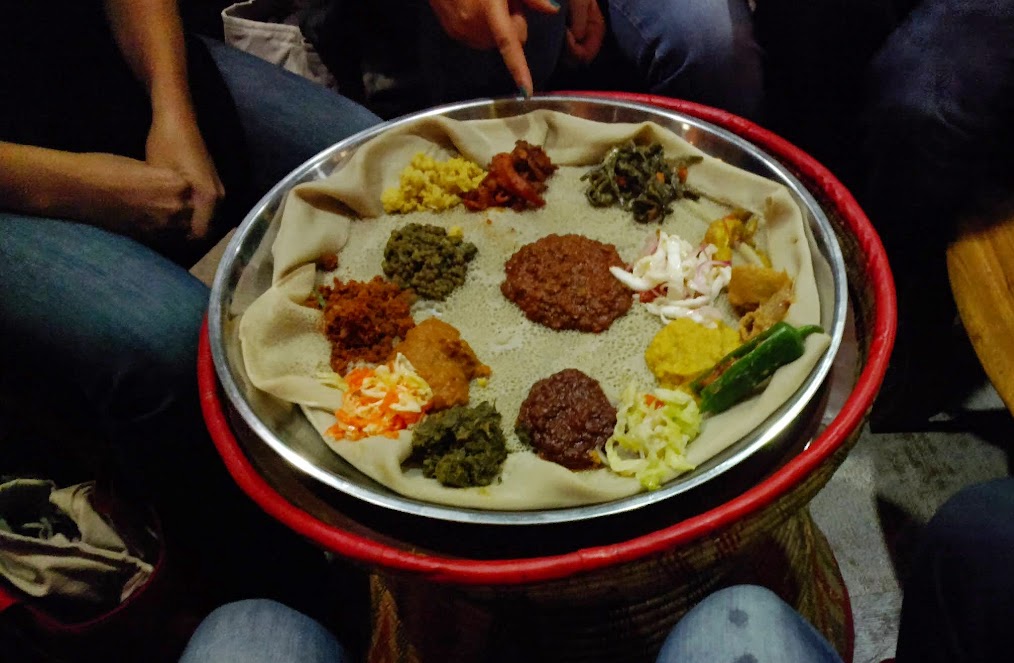
Then, there’s the community. This is really the cornerstone of Learning2 for me and I think many other attendees. The Learning2 community is powerful because it’s inviting and passionate. Although the conference has been running since 2007, there wasn’t the exclusiveness to it that I’ve seen at other conferences. Too often, it’s hard to break into the group if you’re not a “groupie” of the conference. Instead, Learning2 was all about networking, branching out, and meeting new colleagues who you could connect with and then stay in-touch with later through social media. It was about having time to engage in those passionate conversations about teaching and learning and the best tools to help meet varied goals and needs of different contexts.
I would go as far as to say that Learning2 was about becoming part of a family, a large, diverse, and geographically spread out family that loves to share, reflect, learn, and connect. It’s also a family that loves to have fun and that joy, of being together and learning together, was pervasive throughout the conference.
So, if you have a chance to attend a Learning2 conference, I highly encourage it and if it’s a bit too far for you to travel (at least until they are up in running in Europe and the Middle East), then jump in and join our active #Learning2 community on social media! Thanks again to everyone who helped make the #Learning2.014 Africa experience so memorable and for inviting me into the family.










 Margaret A. Powers
You must be logged in to post a comment.