
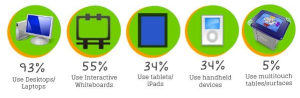
Recently, I had the chance to design and create my first infographic for some survey data collected on technology use in early childhood education. I was excited by the opportunity because it presented a new challenge and the chance to expand my tech skills in a new area.
I began, as I often do, with research. I reviewed some of my favorite infographics that I have saved on Pinterest to get a feel for what I was looking for in my design. Then, I did a few Google searches to see what the top hits were for “creating infographics,” “designing your own infographic” and similar keywords. I was surprised at how old many of the top hits were, especially with sites like visua.ly recently launching their “create” function.
Still, after some digging I was able to find some good resources. There are a number of different sites that can help you create your own infographic. They vary in price and functionality and since I wasn’t interested in the $2,500 starting price for a custom infographic at visual.ly and needed to do more than pull data from Twitter or Facebook, I searched for other tools. I found infogr.am, which lets you choose from a few templates and then upload or add your data but there wasn’t an easy way to add my own icons, which was important for my design plan. Next, I discovered Piktochart and found that I could have a lot of flexibility with the colors, fonts, icons, and charts I used, even with their free service. Another platform, easl.ly, looks like it could also be promising but it’s still in beta and I found it after I had made my infographic and had some trouble with it freezing. Finally, this post on creating infographics just came out on 6/12 and has a number of additional resources.
Since I knew I wanted customized icons to clearly represent my data, I chose Picktochart as my platform and began to explore what was possible with the site and how to arrange my data. I quickly discovered that before I could make progress with my digital infographic, I needed to revert to old-fashioned pen and paper and sketch out a blueprint of my idea. In order for the content to be organized and flow methodically, I had to work out the connections between each piece of data and which ones were best displayed via a graph versus icons versus text. Ultimately, I used the key questions of: Who?, What?, When?, How?, and Why? (and why not?) to structure the flow of the data. Then after outlining everything on paper, I returned to Piktochart to put my blueprint into a digital format.
I adjusted the theme colors and fonts and then began searching Icon Archive for symbols that would represent my data (e.g., a smartphone). You can upload a maximum of 5 images under 1 MB using the free version of Piktochart and I have to say that when I ran into trouble deleting images (the trick is to delete them under Manage Uploads), their customer support was very responsive and helpful! After adding all of my icons and creating a systematic way of presenting each of my big questions, I reviewed my infographic in its entirety and asked a few colleagues to check it over. A second pair of eyes is always helpful to make sure the information will flow and make sense to another audience.
After that, I downloaded my infographic as an image (if you have the paid version you can also download the HTML) and now it’s ready for the world to see! You can find a small clip of it below and the full version is available on ecetech.net.








 Margaret A. Powers
You must be logged in to post a comment.